<!DOCTYPE html>
	<html lang="vi" xmlns="http://www.w3.org/1999/xhtml" prefix="og: http://ogp.me/ns#">
	<head>
<title>Hướng dẫn lấy hình ảnh lưu thành file từ Ms word - Trường Tiểu học Lê Thị Hồng Gấm - TP.Thủ Dầu Một</title>
<meta name="description" content="Hướng dẫn lấy hình ảnh lưu thành file từ Ms word - Savefile - Tin tức -...">
<meta name="author" content="Trường Tiểu học Lê Thị Hồng Gấm - TP.Thủ Dầu Một">
<meta name="copyright" content="Trường Tiểu học Lê Thị Hồng Gấm - TP.Thủ Dầu Một [th-lthg@tptdm.edu.vn]">
<meta name="generator" content="NukeViet v4.5">
<meta name="viewport" content="width=device-width, initial-scale=1">
<meta http-equiv="Content-Type" content="text/html; charset=utf-8">
<meta property="og:title" content="Hướng dẫn lấy hình ảnh lưu thành file từ Ms word">
<meta property="og:type" content="website">
<meta property="og:description" content="Savefile - Tin tức - https&#x3A;&#x002F;&#x002F;thlethihonggam.phuongphuan.edu.vn&#x002F;tin-tuc&#x002F;savefile&#x002F;hoat-dong-doan-the&#x002F;Huong-dan-lay-hinh-anh-luu-thanh-file-tu-Ms-word-289.html">
<meta property="og:site_name" content="Trường Tiểu học Lê Thị Hồng Gấm - TP.Thủ Dầu Một">
<meta property="og:url" content="https://thlethihonggam.phuongphuan.edu.vn/tin-tuc/savefile/hoat-dong-doan-the/Huong-dan-lay-hinh-anh-luu-thanh-file-tu-Ms-word-289.html">
<link rel="shortcut icon" href="https://thlethihonggam.phuongphuan.edu.vn/uploads/thlthg/banner_text_tieuhoc_avinhphutayedu08.png">
<link rel="canonical" href="https://thlethihonggam.phuongphuan.edu.vn/tin-tuc/savefile/hoat-dong-doan-the/Huong-dan-lay-hinh-anh-luu-thanh-file-tu-Ms-word-289.html">
<link rel="alternate" href="https://thlethihonggam.phuongphuan.edu.vn/tin-tuc/rss/" title="Tin tức" type="application/rss+xml">
<link rel="alternate" href="https://thlethihonggam.phuongphuan.edu.vn/tin-tuc/rss/Thong-bao/" title="Tin tức - Thông báo" type="application/rss+xml">
<link rel="alternate" href="https://thlethihonggam.phuongphuan.edu.vn/tin-tuc/rss/Tuyen-sinh/" title="Tin tức - Tuyển sinh" type="application/rss+xml">
<link rel="alternate" href="https://thlethihonggam.phuongphuan.edu.vn/tin-tuc/rss/Tieu-bieu/" title="Tin tức - Tiêu biểu" type="application/rss+xml">
<link rel="alternate" href="https://thlethihonggam.phuongphuan.edu.vn/tin-tuc/rss/Huong-dan/" title="Tin tức - Hướng dẫn" type="application/rss+xml">
<link rel="alternate" href="https://thlethihonggam.phuongphuan.edu.vn/tin-tuc/rss/Ke-hoach/" title="Tin tức - Kế hoạch" type="application/rss+xml">
<link rel="alternate" href="https://thlethihonggam.phuongphuan.edu.vn/tin-tuc/rss/Hoi-nghi/" title="Tin tức - Hội nghị" type="application/rss+xml">
<link rel="alternate" href="https://thlethihonggam.phuongphuan.edu.vn/tin-tuc/rss/thong-ke/" title="Tin tức - Thống kê" type="application/rss+xml">
<link rel="alternate" href="https://thlethihonggam.phuongphuan.edu.vn/tin-tuc/rss/hoat-dong-doan-the/" title="Tin tức - Hoạt động đoàn thể" type="application/rss+xml">
<link rel="alternate" href="https://thlethihonggam.phuongphuan.edu.vn/tin-tuc/rss/ban-tru/" title="Tin tức - Bán trú" type="application/rss+xml">
<link rel="alternate" href="https://thlethihonggam.phuongphuan.edu.vn/tin-tuc/rss/gioi-thieu-csvc-ban-tru/" title="Tin tức - Giới thiệu csvc bán trú" type="application/rss+xml">
<link rel="alternate" href="https://thlethihonggam.phuongphuan.edu.vn/tin-tuc/rss/thuc-don/" title="Tin tức - Thực đơn" type="application/rss+xml">
<link rel="alternate" href="https://thlethihonggam.phuongphuan.edu.vn/tin-tuc/rss/suc-khoe-va-dinh-duong/" title="Tin tức - Sức khỏe và dinh dưỡng" type="application/rss+xml">
<link rel="alternate" href="https://thlethihonggam.phuongphuan.edu.vn/tin-tuc/rss/cai-cach-hanh-chinh/" title="Tin tức - CẢI CÁCH HÀNH CHÍNH" type="application/rss+xml">
<link rel="preload" as="style" href="https://thlethihonggam.phuongphuan.edu.vn/assets/css/font-awesome.min.css" type="text/css">
<link rel="preload" as="style" href="https://thlethihonggam.phuongphuan.edu.vn/themes/edu36th/css/bootstrap.min.css" type="text/css">
<link rel="preload" as="style" href="https://thlethihonggam.phuongphuan.edu.vn/themes/edu36th/css/style.css" type="text/css">
<link rel="preload" as="style" href="https://thlethihonggam.phuongphuan.edu.vn/themes/edu36th/css/style.responsive.css" type="text/css">
<link rel="preload" as="style" href="https://thlethihonggam.phuongphuan.edu.vn/themes/edu36th/css/style-red.css" type="text/css">
<link rel="preload" as="style" href="https://thlethihonggam.phuongphuan.edu.vn/themes/edu36th/css/news.css" type="text/css">
<link rel="preload" as="style" href="https://thlethihonggam.phuongphuan.edu.vn/themes/edu36th/css/custom.css" type="text/css">
<link rel="preload" as="script" href="https://thlethihonggam.phuongphuan.edu.vn/assets/js/jquery/jquery.min.js" type="text/javascript">
<link rel="preload" as="script" href="https://thlethihonggam.phuongphuan.edu.vn/assets/js/language/vi.js" type="text/javascript">
<link rel="preload" as="script" href="https://thlethihonggam.phuongphuan.edu.vn/assets/js/DOMPurify/purify3.js" type="text/javascript">
<link rel="preload" as="script" href="https://thlethihonggam.phuongphuan.edu.vn/assets/js/global.js" type="text/javascript">
<link rel="preload" as="script" href="https://thlethihonggam.phuongphuan.edu.vn/assets/js/site.js" type="text/javascript">
<link rel="preload" as="script" href="https://thlethihonggam.phuongphuan.edu.vn/themes/edu36th/js/news.js" type="text/javascript">
<link rel="preload" as="script" href="https://thlethihonggam.phuongphuan.edu.vn/themes/edu36th/js/main.js" type="text/javascript">
<link rel="preload" as="script" href="https://thlethihonggam.phuongphuan.edu.vn/themes/edu36th/js/custom.js" type="text/javascript">
<link rel="preload" as="script" href="https://thlethihonggam.phuongphuan.edu.vn/themes/edu36th/js/bootstrap.min.js" type="text/javascript">
<link rel="StyleSheet" href="https://thlethihonggam.phuongphuan.edu.vn/assets/css/font-awesome.min.css">
<link rel="StyleSheet" href="https://thlethihonggam.phuongphuan.edu.vn/themes/edu36th/css/bootstrap.min.css">
<link rel="StyleSheet" href="https://thlethihonggam.phuongphuan.edu.vn/themes/edu36th/css/style.css">
<link rel="StyleSheet" href="https://thlethihonggam.phuongphuan.edu.vn/themes/edu36th/css/style.responsive.css">
<link rel="StyleSheet" href="https://thlethihonggam.phuongphuan.edu.vn/themes/edu36th/css/style-red.css">
<link rel="StyleSheet" href="https://thlethihonggam.phuongphuan.edu.vn/themes/edu36th/css/news.css">
<link rel="StyleSheet" href="https://thlethihonggam.phuongphuan.edu.vn/themes/edu36th/css/custom.css">
<style type="text/css">
	body{background: #fff;}
</style>
	</head>
	<body>
<div id="print">
	<div id="hd_print">
		<h2 class="pull-left">Trường Tiểu học Lê Thị Hồng Gấm - TP.Thủ Dầu Một</h2>
		<p class="pull-right"><a title="Trường Tiểu học Lê Thị Hồng Gấm - TP.Thủ Dầu Một" href="https://thlethihonggam.phuongphuan.edu.vn/">https://thlethihonggam.phuongphuan.edu.vn</a></p>
	</div>
	<div class="clear"></div>
	<hr />
	<div id="content">
		<h1>Hướng dẫn lấy hình ảnh lưu thành file từ Ms word</h1>
		<ul class="list-inline">
			<li>Thứ sáu - 22/04/2016 10:39</li>
			<li class="hidden-print txtrequired"><em class="fa fa-print">&nbsp;</em><a title="In ra" href="javascript:;" onclick="window.print()">In ra</a></li>
			<li class="hidden-print txtrequired"><em class="fa fa-power-off">&nbsp;</em><a title="Đóng cửa sổ này" href="javascript:;" onclick="window.close()">Đóng cửa sổ này</a></li>
		</ul>
		<div class="clear"></div>
		<div id="hometext">
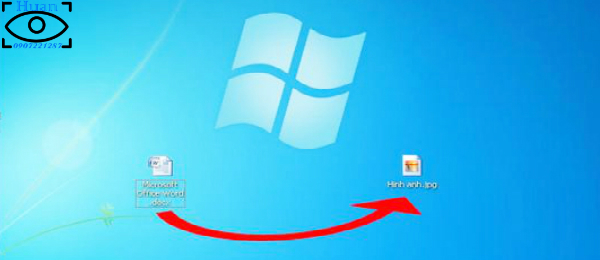
			            Bạn đang có file văn bản Word chứa hình ảnh cần lấy. Nếu thực hiện cách thủ công là ngồi chụp lại màn hình hay sử dụng phần mềm chụp ảnh, cắt rồi chỉnh sửa. Việc làm này mất rất nhiều thời gian nếu trong file Word có hàng chục, hàng trăm, ... hình ảnh cần lấy.
		</div>
				<div class="imghome">
			<img alt="Hướng dẫn lưu lại hình ảnh từ file Ms word" src="https://thlethihonggam.phuongphuan.edu.vn/uploads/thlthg/tin-tuc/temp_pic/cntt/22042016_hd_layhinhtufileword/0.jpg" width="640" class="img-thumbnail" />
						<p>
				<em>Hướng dẫn lưu lại hình ảnh từ file Ms word</em>
			</p>
		</div>
		<div class="clear"></div>
		<div id="bodytext" class="clearfix">
			<p style="text-align: center;"><span style="font-size:16px;"><strong>A. Hướng dẫn thao tác đơn giản để<br  />
copy 1 hay một vài hình ảnh từ Word.</strong></span></p>

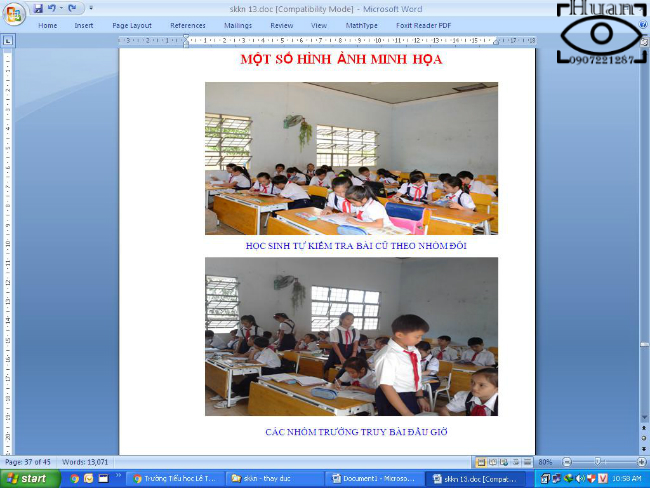
<p><span style="font-size:16px;">Bước đầu tiên mở file Word ra tìm đến hình ảnh mà mình muốn copy lại.</span></p>

<p style="text-align:center"><img alt="1" src="https://thlethihonggam.phuongphuan.edu.vn/uploads/thlthg/news/temp_pic/cntt/22042016_hd_layhinhtufileword/1.jpg" /></p>

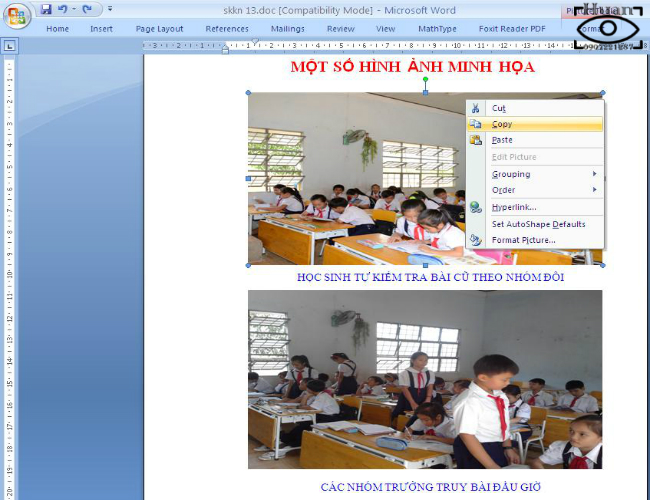
<p><span style="font-size:16px;">Sau đó thì <strong>Click chuột phải</strong> tại tấm hình mà mình muốn copy chọn <strong>COPY</strong>&nbsp;</span></p>

<p style="text-align:center"><img alt="1" height="500" src="https://thlethihonggam.phuongphuan.edu.vn/uploads/thlthg/news/temp_pic/cntt/22042016_hd_layhinhtufileword/2.jpg" width="650" /></p>

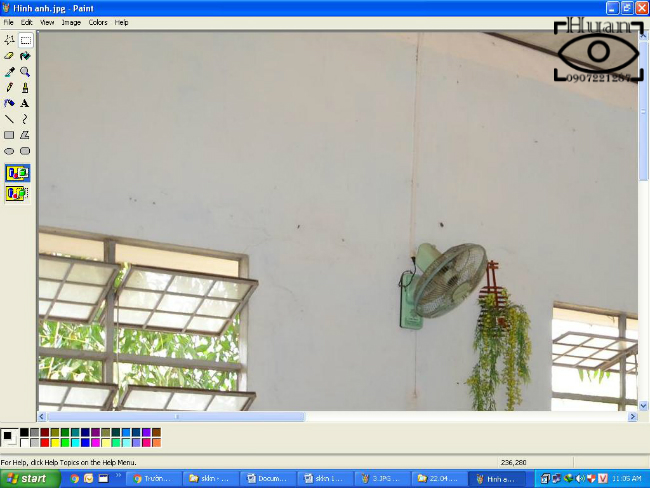
<p><span style="font-size:16px;">Sau đó nhấn tổ hợp phím: <strong>Windows + R</strong> sẽ xuất hiện hộp thoại <strong>RUN</strong>, chúng ta gõ vào hộp thoại dòng chữ<strong> MsPaint </strong>thì phần mềm Paint sẽ hiện ra.</span></p>

<p><span style="font-size:16px;">Tiếp theo chúng ta nhấn <strong>Ctrl + V</strong> để dán hình ảnh vừa copy từ word vào Paint</span></p>

<p style="text-align:center"><img alt="1" height="488" src="https://thlethihonggam.phuongphuan.edu.vn/uploads/thlthg/news/temp_pic/cntt/22042016_hd_layhinhtufileword/4.jpg" width="650" /></p>

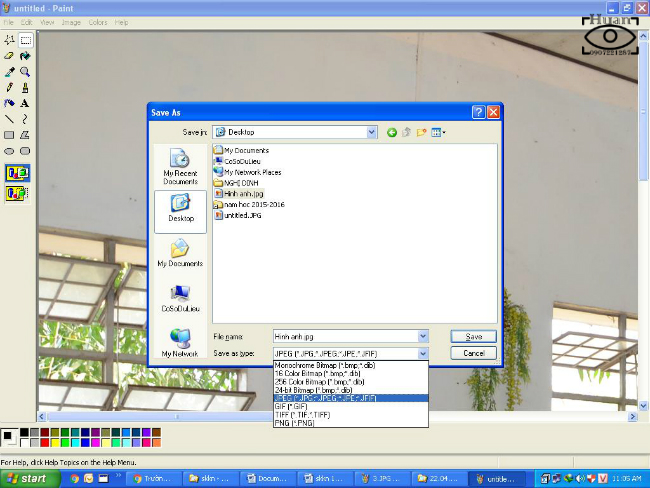
<p><span style="font-size:16px;">Sau khi Paste xong thì chúng ta tiến hành lưu lại hình ảnh thành file có định dạng &quot;<strong>.JPG</strong>&quot; bằng cách nhấn tổ hợp phím <strong>Ctrl + S</strong> hay góc trái màn hình chọn <strong>File -&gt; Save.</strong></span></p>

<p style="text-align:center"><img alt="1" height="488" src="https://thlethihonggam.phuongphuan.edu.vn/uploads/thlthg/news/temp_pic/cntt/22042016_hd_layhinhtufileword/5.jpg" width="650" /></p>

<p><span style="font-size:16px;">Hộp thoại Save sẽ hiện ra, chúng ta cần chọn nơi cần lưu trữ những hình ảnh này,<br  />
Tại mục: <strong>File names:</strong> &nbsp; &nbsp;là đặt tên cho file hình ảnh cần lưu.<br  />
&nbsp; &nbsp; &nbsp; &nbsp; &nbsp; &nbsp;<strong> &nbsp; Save as type:</strong> ta cần chọn là <strong>JPEG&nbsp;(*.Jpg,....)</strong> giống như hình bên trên.</span></p>

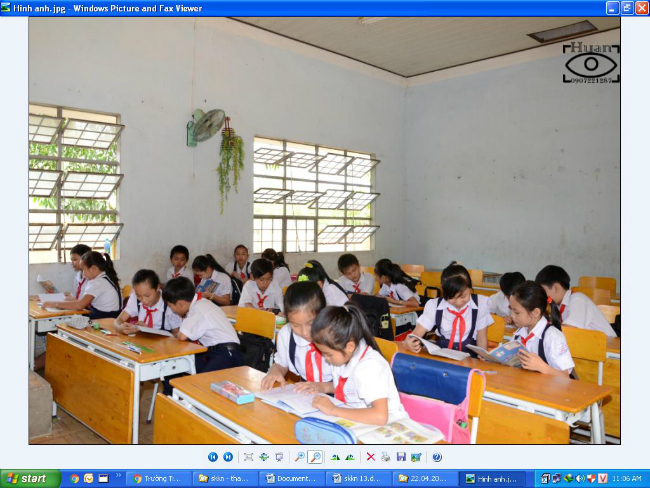
<p style="text-align:center"><img alt="1" height="488" src="https://thlethihonggam.phuongphuan.edu.vn/uploads/thlthg/news/temp_pic/cntt/22042016_hd_layhinhtufileword/6.jpg" width="650" /></p>

<p><span style="font-size:16px;">Như vậy là xong chúng ta đã có file hình ảnh như mong muốn và có thể chèn vào file word khác làm SKKN hay file Power Point để trình chiếu v.v.</span></p>

<p style="text-align: center;"><span style="font-size:16px;"><strong style="font-size: 16px; line-height: 25.6px; text-align: center;">B. Hướng dẫn lấy ra nhiều&nbsp;hình ảnh từ Word nhanh nhất.</strong></span></p>

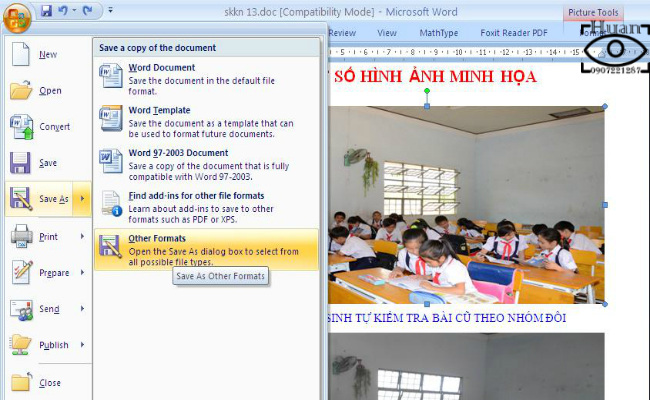
<p><span style="font-size:16px;">Bước đầu tiền cần làm là mở <strong>File Word</strong> ra, sau đó chọn <strong>Save As</strong> (vào nút Rippon của Ms word bên góc trên bên trái), chọn tiếp <strong>Other Formats </strong>như hình bên dưới.</span></p>

<p style="text-align:center"><img alt="7" height="400" src="https://thlethihonggam.phuongphuan.edu.vn/uploads/thlthg/news/temp_pic/cntt/22042016_hd_layhinhtufileword/7.jpg" width="650" /></p>

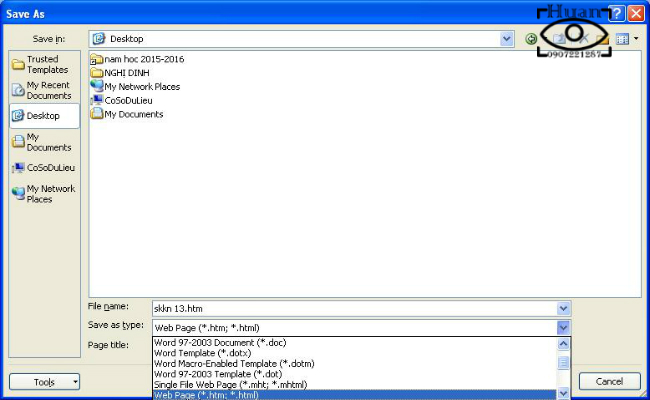
<p><span style="font-size:16px;">Sau đó chọn nơi cần lưu lại, ở đây tôi chọn lưu là <strong>Desktop</strong>&nbsp;và ở 2 mục bên dưới:<br  />
Bạn phải chọn mục <strong>Save as Type</strong>&nbsp;trước mục <em>File name</em>, trong hộp thoại được xổ xuống thì chúng ta chọn là <strong>Web Page (*.htm; *.html) </strong>sau đó ở mục trên <strong>File Name</strong> thì bạn đặt lại tên file nếu muốn.</span></p>

<p style="text-align:center"><img alt="7" height="400" src="https://thlethihonggam.phuongphuan.edu.vn/uploads/thlthg/news/temp_pic/cntt/22042016_hd_layhinhtufileword/8.jpg" width="650" /></p>

<table align="center" border="0" cellpadding="0" cellspacing="0" style="width:530px;" width="530">
	<tbody>
		<tr>
			<td style="width:366px;">
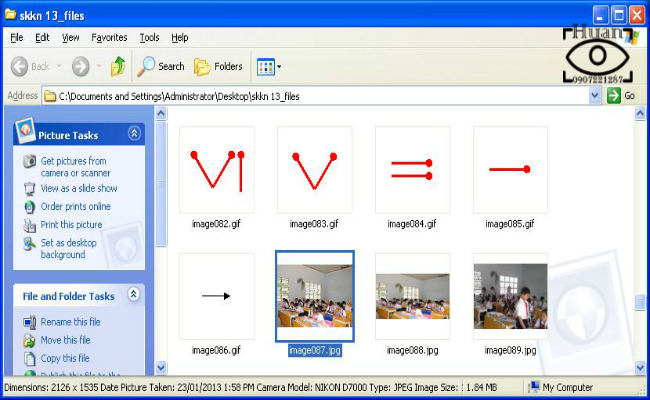
			<p style="line-height: 20.8px;"><span style="font-size:16px;">Sau khi (Save As)&nbsp;lưu lại thì tại nơi chúng ta lưu sẽ có 1&nbsp;<strong>File .HTML</strong><br  />
			và 1 thư mục có tên ở cuối là&nbsp;<strong>_FILES</strong></span></p>

			<p style="line-height: 20.8px;"><span style="font-size:16px;">Và chúng ta chỉ việc mở thư mục<strong>&nbsp;...._files</strong>&nbsp;ra xem chọn hình ảnh nào cần lấy thôi.</span></p>

			<p style="line-height: 20.8px;"><span style="font-size:16px;">Như hình minh họa bên dưới, thật nhanh gọn và lẹ.</span></p>
			</td>
			<td style="width:161px;">
			<p style="text-align:center"><img alt="7" height="200" src="https://thlethihonggam.phuongphuan.edu.vn/uploads/thlthg/news/temp_pic/cntt/22042016_hd_layhinhtufileword/9.jpg" width="120" /></p>
			</td>
		</tr>
	</tbody>
</table>
<p style="text-align:center"><img alt="7" height="400" src="https://thlethihonggam.phuongphuan.edu.vn/uploads/thlthg/news/temp_pic/cntt/22042016_hd_layhinhtufileword/10.jpg" width="650" /></p>

<p><i style="display: inline-block; width: 18px; height: 16px; margin-right: 5px; background: url(&#039;../images/bg_c.png&#039;) -26px -770px no-repeat;">&nbsp;</i><span style="font-size:16px;"><u><strong>Chú ý<em>:</em></strong></u><em> Đôi lúc khi lưu trang Word, nó có thể chia 1 hình ảnh của bạn ra thành các kích cỡ khác nhau, bạn chỉ cần lấy hình ảnh nào có kích cỡ lớn hơn và sử dụng cho các công việc còn lại của mình.</em></span></p>

<p><span style="font-size:16px;">Trên đây tôi đã hướng dẫn các bạn cách lấy hình ảnh từ file văn bản Word một cách nhanh nhất, nhờ đó bạn dễ dàng lấy ảnh từ file Word mà không cần thực hiện các thao tác phức tạp hay cài đặt phần mềm hỗ trợ.</span></p>
		</div>
				<div id="author">
						<p>
				<strong>Tác giả:</strong>
				Huannv
			</p>
						<p>
				<strong>Nguồn tin:</strong>
				TH Lê Thị Hồng Gấm
			</p>
		</div>
				<div class="copyright">
		</div>
	</div>
	<div id="footer" class="clearfix">
		<div id="url">
			<strong>URL của bản tin này: </strong><a href="https://thlethihonggam.phuongphuan.edu.vn/tin-tuc/savefile/hoat-dong-doan-the/Huong-dan-lay-hinh-anh-luu-thanh-file-tu-Ms-word-289.html" title="Hướng dẫn lấy hình ảnh lưu thành file từ Ms word">https://thlethihonggam.phuongphuan.edu.vn/tin-tuc/savefile/hoat-dong-doan-the/Huong-dan-lay-hinh-anh-luu-thanh-file-tu-Ms-word-289.html</a>

		</div>
		<div class="clear"></div>
		<div class="copyright">
			&copy; Trường Tiểu học Lê Thị Hồng Gấm - TP.Thủ Dầu Một
		</div>
		<div id="contact">
			<a href="mailto:th-lthg@tptdm.edu.vn">th-lthg@tptdm.edu.vn</a>
		</div>
	</div>
</div>
        <div id="timeoutsess" class="chromeframe">
            Bạn đã không sử dụng Site, <a onclick="timeoutsesscancel();" href="https://thlethihonggam.phuongphuan.edu.vn/#">Bấm vào đây để duy trì trạng thái đăng nhập</a>. Thời gian chờ: <span id="secField"> 60 </span> giây
        </div>
        <div id="openidResult" class="nv-alert" style="display:none"></div>
        <div id="openidBt" data-result="" data-redirect=""></div>
<div id="run_cronjobs" style="visibility:hidden;display:none;"><img alt="cron" src="/index.php?second=cronjobs&amp;p=p3qhm54O" width="1" height="1" /></div>
<script src="https://thlethihonggam.phuongphuan.edu.vn/assets/js/jquery/jquery.min.js"></script>
<script>var nv_base_siteurl="/",nv_lang_data="vi",nv_lang_interface="vi",nv_name_variable="nv",nv_fc_variable="op",nv_lang_variable="language",nv_module_name="tin-tuc",nv_func_name="savefile",nv_is_user=0, nv_my_ofs=7,nv_my_abbr="+07",nv_cookie_prefix="nv4c_Cgoz2",nv_check_pass_mstime=1738000,nv_area_admin=0,nv_safemode=0,theme_responsive=1,nv_recaptcha_ver=2,nv_recaptcha_sitekey="6LcNwC8UAAAAAMm8ZTYNygweLUQtOU0IapbDRk69",nv_recaptcha_type="image",XSSsanitize=1;</script>
<script src="https://thlethihonggam.phuongphuan.edu.vn/assets/js/language/vi.js"></script>
<script src="https://thlethihonggam.phuongphuan.edu.vn/assets/js/DOMPurify/purify3.js"></script>
<script src="https://thlethihonggam.phuongphuan.edu.vn/assets/js/global.js"></script>
<script src="https://thlethihonggam.phuongphuan.edu.vn/assets/js/site.js"></script>
<script src="https://thlethihonggam.phuongphuan.edu.vn/themes/edu36th/js/news.js"></script>
<script src="https://thlethihonggam.phuongphuan.edu.vn/themes/edu36th/js/main.js"></script>
<script src="https://thlethihonggam.phuongphuan.edu.vn/themes/edu36th/js/custom.js"></script>
<script src="https://thlethihonggam.phuongphuan.edu.vn/themes/edu36th/js/bootstrap.min.js"></script>
</body>
</html>